The Branch Method
How to stop “Context Drift” and fix ChatGPT’s biggest organizational flaw.
If you are integrating AI into your daily workflow, you have likely encountered the “Megathread” problem.
You start a chat with one clear goal, perhaps drafting a proposal for a new client. But as you work, the conversation zigzags. You ask about technical specs, then detour into pricing strategy, then ask for an email draft, and suddenly, you are 40 messages deep.
The chat becomes an ungodly tangle of half-related threads. You know there was a brilliant idea fifteen messages back, but Ctrl + F returns a forest of irrelevant matches.
Worse, the AI starts to feel… sluggish. It pauses longer between answers. It starts “forgetting” instructions you gave it at the start.
This isn't just in your head. It’s a technical limitation called “Context Drift,” and there is a simple button hidden in the interface that fixes it.

Why Your Long Chats Get “Dumb”
To understand the fix, you have to understand the problem.
When you have a massive conversation history, the AI has to “re-read” the entire conversation every time you ask a new question to ensure it maintains context.
Latency: This “re-reading” takes processing power, which causes that annoying lag before it starts typing.
Context Drift: The more text you feed it, the more “noise” creates distraction. If you discussed three different topics in one thread, the AI struggles to prioritize which instructions are currently relevant.
The Solution (Branching)
Most people think the only solution is to start a brand-new chat. The problem is, you lose all the good context—the client name, the project tone, and the background info.
OpenAI recently released a feature that solves this: Branching.
Instead of starting over, you can split the timeline.
How to do it:
Scroll back to the specific message where the conversation was still “pure” (before you went off on a tangent).
Hover over your message (or the AI’s response).
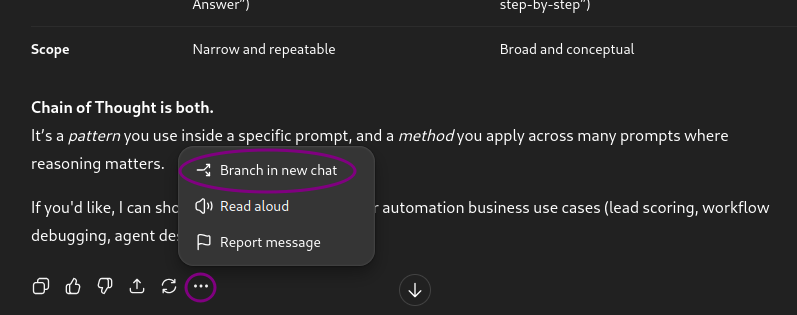
Click the three dots “…” to the right of the response.
Select “Branch in new chat”.
The “Branching” Workflow for Pros
This creates a duplicate conversation in a new sidebar tab. The original thread stays untouched, but now you have a “sandbox” to explore a specific idea without polluting the main thread.
Here is how I use this in a sales/technical workflow:
The Main Thread: Contains the “Source of Truth” (Client needs, Site Survey notes, Core Project Scope).
Branch A (The Email): I branch off to ask the AI to write a follow-up email. Once I get the email, I delete the branch.
Branch B (The Technical Deep Dive): I branch off to troubleshoot a specific piece of hardware compatibility. I can paste in messy error logs here without cluttering the main proposal thread.
Conclusion
By using this technique, you keep your main conversations clean and focused. You speed up the AI’s response time because it isn't processing thousands of words of irrelevant “side quests.”
You will still need to start a fresh chat eventually, but "Branching" lets you squeeze much more mileage out of your best conversations.